How to Withdraw Money from Yono Games
Last updated 10 Mar 2026

Withdrawing money from Yono games is a simple process. However, before placing a withdrawal request, make sure your account balance meets the minimum withdrawal limit of ₹100. If your balance is above this amount, you can transfer the money to your bank account in just a few steps. Follow the guide below to complete the withdrawal easily.
You can also explore other apps listed on Yono Store to discover more gaming platforms and guides.
Step 1: Open the Bank Section

After opening the Yono game app, log in to your account.
On the bottom left corner of the screen, you will find the Bank section. Tap on it to open your wallet and banking options.
Step 2: Click on Withdraw Instantly
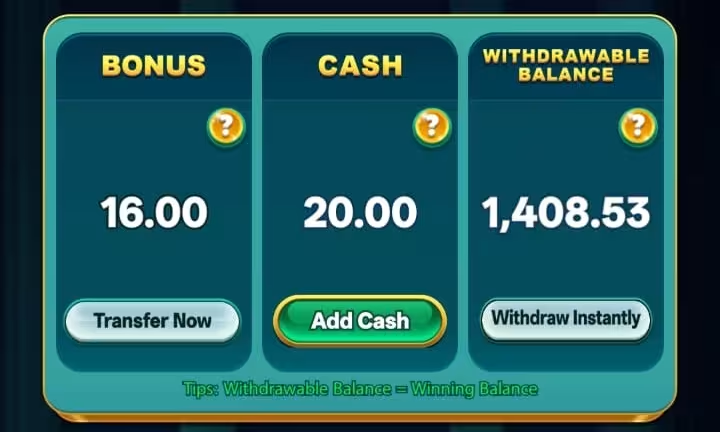
After opening the Bank section, you will see different wallet and transaction options available. Look for the Withdraw Instantly button, which is used to transfer your available balance to your bank account.
Tap on Withdraw Instantly to begin the withdrawal process. This will take you to the next screen where you can select your bank account and enter the amount you want to withdraw.
Step 3: Add or Select Your Bank Account
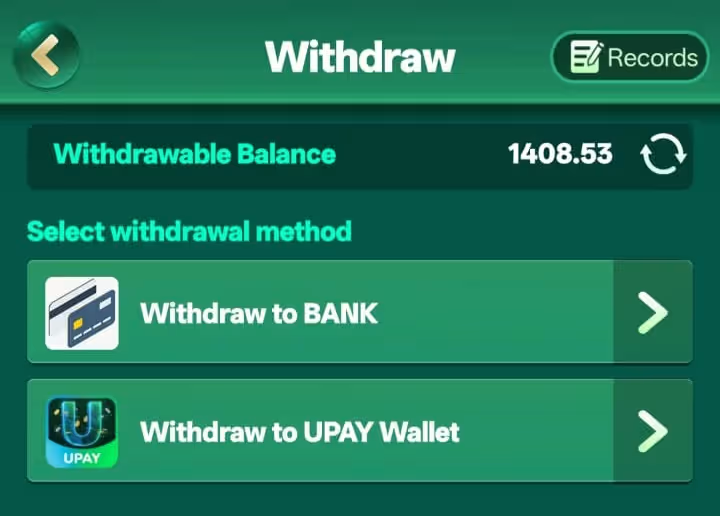
Next, choose the Withdraw to Bank option to proceed with the transaction.
- If you have already added a bank account, simply select the saved account from the list.
- If this is your first withdrawal, tap Add New Bank Account and enter your bank details such as the account number, bank name, and other required information.
In some apps, you may also see additional withdrawal options such as Withdraw to UPAY Wallet or other supported wallet services. You can select the option that is available and convenient for you.
Once your payment method is selected, enter the amount you want to withdraw. After reviewing the details, tap on Withdraw Money to submit your withdrawal request.
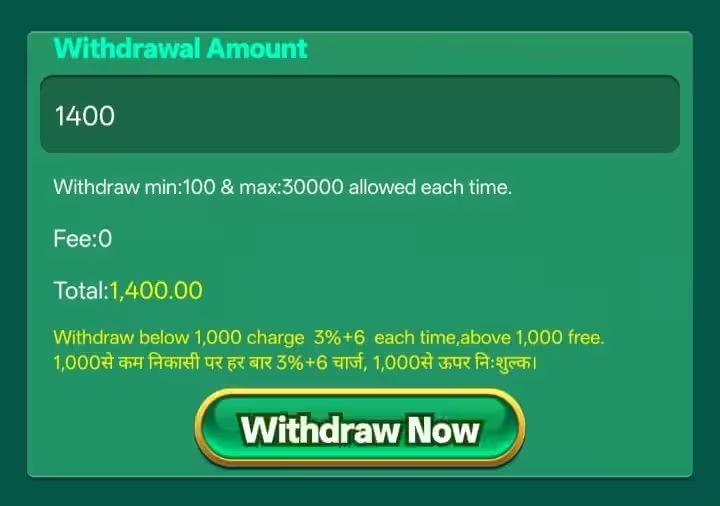
Note: A small processing fee is applied for withdrawals below ₹1000. This fee is automatically deducted during the withdrawal process, so review the final amount before confirming.
Withdrawal Processing Time
In most cases, withdrawals are processed instantly, and the money is credited to your bank account within a few minutes after confirming the request.
However, in some situations such as server delays, bank processing time, or technical issues, the transaction may take 12 to 24 hours to be completed. If the payment does not arrive instantly, it is usually processed within this timeframe. If your withdrawal has been stuck for longer than usual, check out our detailed guide on why your Yono game app withdrawal is pending for the common reasons and what to do next.
In rare cases, a withdrawal request may fail outright instead of just being delayed, usually due to incorrect bank details, a bank server outage, or a temporarily blocked bank account. If that happens to you, our guide on why a Yono games withdrawal fails and how to fix it walks through the common causes and how to resolve them. There is also a slightly different situation where the app shows the withdrawal as successful, but the amount still hasn't reached your bank account. If that's what you're seeing, our Withdrawal Success But Not Credited guide explains why this happens and what to do about it.
Quick Tip
Always double-check your bank details and withdrawal amount before confirming the request to avoid mistakes or delays in the transaction.
If you're looking to try more gaming platforms, you can check out our guide on best Yono games to discover some of the most popular apps available right now.

Stay Connected with Yono Store
Get instant updates, new app releases, exclusive bonuses, and withdrawal proofs directly from Yono Store!
Join Our Telegram ChannelFrequently Asked Questions

I have been researching and reviewing mobile gaming apps for over 2 years, helping readers understand app features, bonuses, safety, and overall user experience. My goal is to publish clear, accurate, and regularly updated content so users can make informed decisions before downloading any app.